Courier tracking guides
Porter Live Tracking: How to Track a Porter Trip, Share It and Fix Common Problems
Porter trips are tracked live in the app, not with a courier tracking number. Here's how to follow the vehicle, share the trip and sort out delays.
By Rajita KesarwaniReviewed by Akshansh TyagiPublished Last reviewed 4 min read
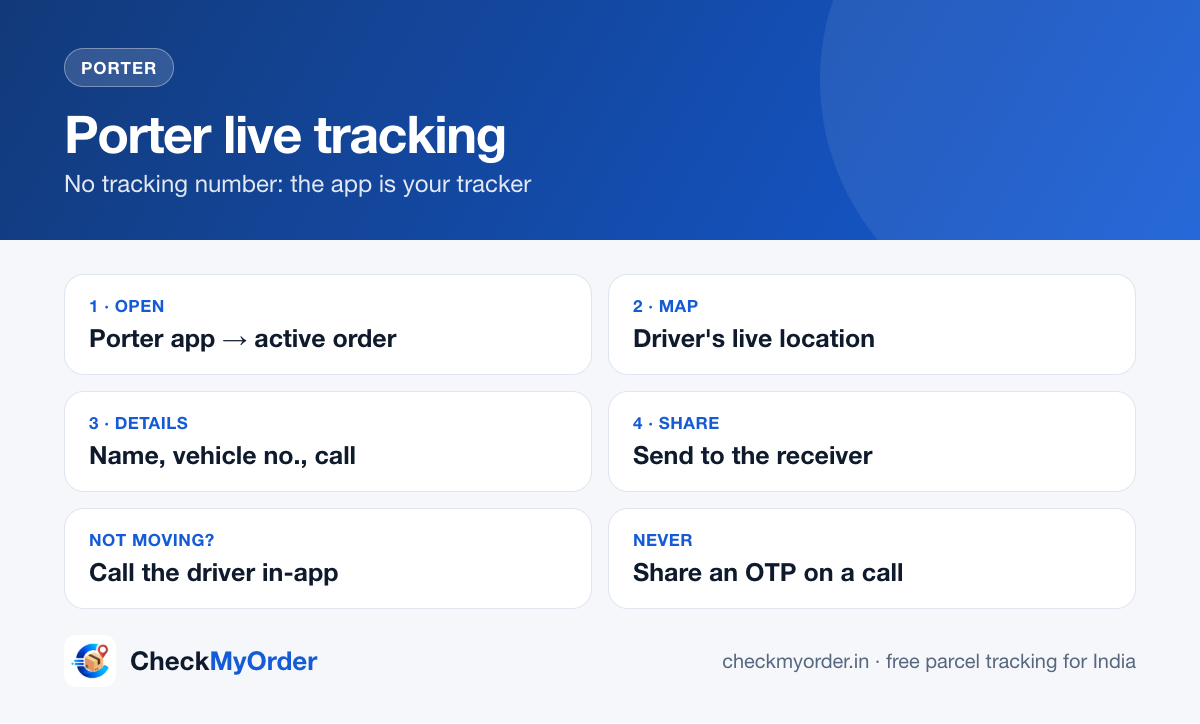
Quick answer Porter is an on-demand delivery service: a two-wheeler, three-wheeler or truck comes to you and drives your goods straight to the drop point. There is no courier tracking number to paste anywhere. You track the trip live in the Porter app: open the app → your active booking → the map shows the driver's location, with the driver's name, vehicle number and a call button. If the person receiving the goods doesn't have the app, use the app's share option (where available) or simply send them the driver's details and vehicle number.
हिंदी में: पोर्टर में कोई कूरियर ट्रैकिंग नंबर नहीं होता। ऐप में अपनी बुकिंग खोलें, नक्शे पर ड्राइवर की लाइव लोकेशन, नाम, गाड़ी का नंबर और कॉल का बटन दिखेगा।
How Porter tracking is different from a courier
| Courier (DTDC, Delhivery…) | Porter | |
|---|---|---|
| What you get | An AWB / tracking number | A booking in the app |
| How it moves | Through hubs, often over days | One vehicle, straight from pickup to drop |
| Tracking | Scan updates at each hub | Live GPS location of the vehicle |
| Who you talk to | Courier customer care | The driver (in-app call) and Porter support |
So if you searched "Porter tracking number", you won't find one. The booking in the app is your tracker. For courier parcels, paste the number on CheckMyOrder instead.
How to track a Porter trip live
- Open the Porter app with the same mobile number used for the booking.
- Go to your current / active order.
- The map shows the vehicle moving. Below it you'll see the driver's name, photo, vehicle number and a call button.
- The trip status changes as it goes: driver assigned → arrived at pickup → loading → on the way → reached drop.
Booked from the Porter website or by someone else? Ask the person who booked to share the live trip or the driver's details with you.
Sharing the trip with the person receiving the goods
The person at the drop point usually just wants to know when the vehicle will arrive. You can:
- use the share option on the trip screen if your app version shows one, and send the link on WhatsApp,
- or send them the driver's name, vehicle number and phone number, so they can call directly,
- and tell them to keep their phone on. Drivers often call the receiver when they're close.
What each trip stage means
| You see | What it means | What you can do |
|---|---|---|
| Searching for driver | Porter is matching a nearby vehicle | Wait a few minutes; at peak times it takes longer |
| Driver assigned | A vehicle has accepted the booking | Check the vehicle type matches your load |
| Arrived at pickup | The driver is at your pickup address | Keep the goods ready. Waiting time may be charged |
| Trip started | Goods are loaded, the vehicle is moving | Track on the map; share with the receiver |
| Reached drop | The vehicle is at the drop point | Unloading and payment, if not prepaid |
Common problems and fixes
The location isn't moving. The driver's phone may have a weak signal or the app was closed. Call the driver from the app. A frozen dot for a few minutes in traffic is normal.
The driver is late or asking for extra money. Check the fare shown in the app before paying anything extra. Report unexplained charges to Porter support from the app's help section.
Wrong vehicle came. Don't load if the vehicle can't carry your goods safely. Cancel from the app and rebook the right size. Check the cancellation terms shown in the app.
Goods damaged or missing. Take photos at once, before the driver leaves, and raise it in the app's help section the same day. Keep the booking ID.
Safety tips
- Share the vehicle number with the receiver before the trip starts.
- Pay only through the app or the method shown in it.
- Never share an OTP or bank details with anyone claiming to be "Porter support" on a random call.
FAQs
Can I track Porter with a tracking number on CheckMyOrder? No. Porter trips are tracked inside the Porter app. CheckMyOrder tracks courier parcels that have an AWB or tracking number.
Can the receiver track without the app? If your app shows a share option, send them the link. If not, share the driver's number and vehicle number.
Does Porter deliver intercity? Porter offers trucks for moves between cities on some routes. Check the options in the app for your route.
Also see our Porter courier page and ways to track a parcel in India.
Sources
Rajita Kesarwani · Head of Digital Marketing & Content
Rajita leads digital marketing and content at CheckMyOrder. She sets the editorial standards, writes guides on tracking online orders, delivery problems, refunds and fake courier messages, and reviews every guide against the courier's and the shop's own help pages before it goes live.
Reviewed by Akshansh Tyagi, Content Writer. Read how we write and check our guides on the About page.